Update your browser
This browser is too old for Romps. Update it, or open Romps in another browser.
Works in Chrome and Edge 111+, Safari 16.4+ and Firefox 114+.
Email supportThis browser is too old for Romps. Update it, or open Romps in another browser.
Works in Chrome and Edge 111+, Safari 16.4+ and Firefox 114+.
Email supportOctober 30, 2026
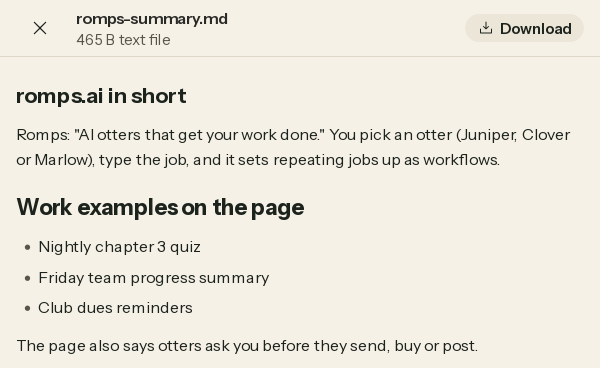
The file viewer lets you read, look at and save a file without leaving the chat it came in.
Click a file or a picture in a chat and it opens over the chat, full screen, inside Romps. It doesn’t open a new tab, and it never sends you to a raw storage link.
Files you send, files an otter sends and pictures all open in the same viewer. When an otter answers from web pages it read, the shots of those pages under its answer open there too.
Close (the X) or the Escape key takes you back to the chat.
The top of the viewer shows the file’s name, with its size and kind under it, like “326 KB image”. At the other end is its one action: Download.
Plain text and JSON show at a reading width. Markdown shows formatted, and a CSV shows as a table. A long file shows its first 1 MB, with a line that says so.
A PNG, JPEG, GIF or WebP picture up to 10 MB fills the screen on a black background. A zip or tar archive lists the files inside it, with their sizes.
Any other file, a PDF you send included, shows its icon with a Download button under it.
Download saves the file under its own name, and you stay in the viewer. It’s a button, not a link, so the file’s address is never on the page to open in a tab or copy.
Read a draft in place. Ask an otter for a write-up as a Markdown file, read it formatted in the viewer, and download it once it’s right.
Check a table before you save it. A CSV an otter sends opens as a table, so you can scan the rows first.
See where an answer came from. When an otter answers from web pages, open the shot of a page under its answer and look at it full screen.
Look inside a zip. Open an archive to see which files it holds and how big they are, then download it if it’s the one you need.
Get started, then open any file in a chat.