Update your browser
This browser is too old for Romps. Update it, or open Romps in another browser.
Works in Chrome and Edge 111+, Safari 16.4+ and Firefox 114+.
Email supportThis browser is too old for Romps. Update it, or open Romps in another browser.
Works in Chrome and Edge 111+, Safari 16.4+ and Firefox 114+.
Email supportOctober 30, 2026
Connecting Asana, ClickUp, monday.com or Airtable lets you hand your otters work in the tools where your team keeps its tasks.
Each one is a tile in Your apps. Add your own key, and the otter you pick can read your tasks, boards or records, then add or change them after asking first.
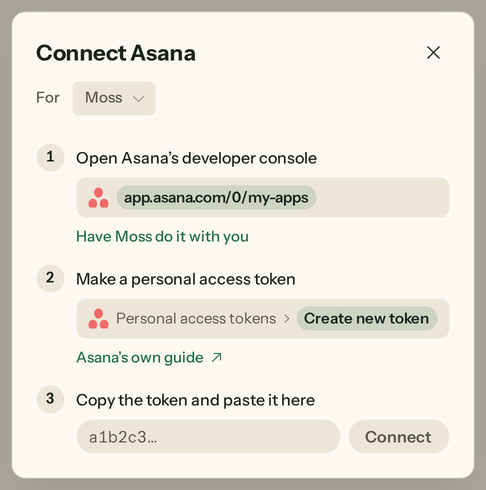
In Your apps, the four sit under “Your otter can connect these”, each tile with a plus. Choose one and its sheet opens on three short steps, each showing where the key lives in that app, with a link to the app’s own guide.
Pick the otter it’s for at the top. Editors and admins can add a key; for everyone else in the organization, these apps still show as coming soon.
Make a token in the app, paste it in and choose Connect. We try the key once with the app before anything is stored, and the sheet tells you “It works” or asks you to paste the whole key again.
Or have your otter do it with you, from the first step. It opens the app in its own browser and goes through the steps while you watch. When the app wants you to sign in, you take over, and the otter never sees your password. Romps takes the key off the page for it, and the otter only ever sees it hidden.
Either way, the key goes only to that app, and your otter never sees it.
A key works for the otter you added it for. Add for another otter gives the app to one more, and Remove takes it off one. Only the person who added a key, or an admin, can take it off the last otter.
Asana: read your workspaces, projects and open tasks, add tasks and update them.
ClickUp: read your workspaces, spaces, folders, lists and their tasks, add tasks to a list and update them.
monday.com: read your boards and their items, add items and change their columns.
Airtable: read your bases, tables and records, add records and update them. When your otter makes the key with you, the key can read and write records in the bases you pick, unless you ask otherwise.
By default, before an otter adds or changes anything, a card in the chat says it wants to use the app, with Approve and Deny, and waits for an editor. Reads go straight through.
One exception: monday.com takes reads the same way as writes, so a read there may wait for approval too. And an otter set to just do it still asks once it has read outside content, like an email.
A project roundup. Ask an otter to read the open tasks in an Asana project and sum up where things stand in your group chat.
Notes into tasks. Hand an otter your meeting notes, and it adds each action item to your ClickUp list once you approve.
A board that keeps up. Tell an otter what got done, and it moves those items along on your monday.com board, each change approved in the chat.
Rows from a list. Paste a list of names and emails, and an otter adds them as records in your Airtable base after you say yes.
Get started, then open Your apps.